
🦜 Why Data Storytelling?
We’ve created more data in the past 2 years than in the past 10,000 combined and only 0.5% of the world’s data is ever used.
Even the most talented and heavily-recruited individuals in economics, mathematics, or statistics struggle with communicating their insights to others effectively. Essentially, it can be difficult to tell the story behind the numbers.
The phrase “data storytelling” has been associated with many things—data visualizations, infographics, dashboards, data presentations, and so on. Too often, data storytelling is interpreted as simply visualizing data effectively; however, it is much more than just creating visually-appealing data charts. Data storytelling is a structured approach for communicating data insights, and it involves a combination of three key elements: data, visuals, and narrative.
When you package your insights as a data story, you build a bridge for your data to the influential, emotional side of the brain. When neuroscientists observed the effects detailed information had on an audience, brain scans revealed it only activated two areas of the brain associated with language processing: Broca’s area and Wernicke’s area. However, when someone is absorbed in a story, neuroscientists discovered the information stimulated more areas of the brain. People hear statistics, but they feel stories (source).
📈 What is Data Visualization?

Data Visualization is an interdisciplinary field that combines computer science, graphic design, and statistics to communicate (mostly quantitative) data or information. It can also go beyond regular charts and graphs to include any use of shapes, color, and sizing to draw visual focus to data findings. The addition of a visual element contributes additional insight, understanding, or patterns and is not only decorative (source).
Data visualization can:
- Provide context
- Elevate and draw attention to key insights (and visually subdue the others)
- Lead to action (Remember the problem statement 😀)
📊 Infographic vs Data Visualization

Data visualizations and infographics are very similar, leading to a lot of confusion and debate over which is which. While they are related, infographics and data visualizations are not one and the same. It’s important to understand the strengths of each option so you can choose the best approach for your information.
Data visualization is the translation of datasets into a meaningful and easy-to-understand visual medium. It’s incredibly useful for companies that are dealing with tons of big data. Data visualizations are dynamic and often built using various programming languages including JavaScript, D3.js, CSS, and HTML.
An infographic combines text, illustrations, icons, graphs, and charts in a carefully organized progression. Unlike data visualizations, infographics are static pieces often built using design software, including Adobe Photoshop and Illustrator (source).
🕰️ The Beginning of Data Visualization
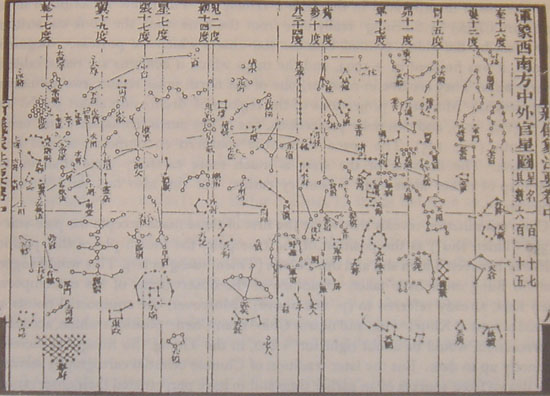
Data visualization has a long history. Here is a star chart made by Su Song in China in 1092.
And here is a pie-circle-line chart created by William Playfair in 1801.

Jacques Bertin studied the effectiveness of different types of charts. In the example below, the pie charts show the production of various kinds of meat in several countries. Bertin regarded these pie charts as “useless” because it is difficult to show comparisons accurately. By employing matrix visualization (as pictured in the middle), high-level patterns become more immediately visible. And on the right, since countries and meat production do not have a natural order, many other matrices can be produced—including the example shown—which provided much more clarity. In this scenario, the reordering of categories significantly improved the presentation of data (source).

🗺️ Examples of Data Viz in Everyday Life
We encounter data visualizations every day of our lives without even realizing it. The bars on the screen of your treadmill, the subway map you use to get to work, the graphics in your daily news – these are all subtle ways visualizations have been incorporated into your life.


⭐ Why is Visualization Important?
"More than 50% of our cortex, the surface of the brain, is devoted to processing visual information." - William G. Allyn, Professor of Medical Optics | University of Rochester
When trying to understand data, having a visualization, or picture of it, is often much more effective for communicating information than the raw data itself. No matter what business or career you choose, data visualization can help by delivering data in the most efficient way possible.
Data visualization takes raw data, models it, and delivers the data so that conclusions can be reached. In advanced analytics, data scientists are creating machine learning algorithms to better compile essential data into visualizations that are easier to understand and interpret (source).
Here are a few other benefits of data visualization:
- Quick, clear understanding of information
- Easy to identify emerging trends and act quickly based on what is shown
- Easy to identify patterns and relationships within the data
- Allows for analysis at various levels of detail
🗣️ Digesting Information
In a data visualization context, illusions are dangerous because they can make us see things that aren’t really there in the data. Good practice helps us to avoid these optical illusions, but occasionally they can still sneak in through design choices, or just quirks in the way data lines up.

Cognitive illusions are often serious problems for data visualization. It is often hard to notice when they happen. Colors can be a cause for concern because they are easily harmed by our cognitive processes. As you can see from the image below, the surrounding colors make a big difference in how we perceive a color. Element placement, background colors, borders, and spacing can all help to alleviate these problems (source).

Size illusions can also be a major problem (They are especially problematic in bubble plots). The illusion below illustrates two circles of identical size placed near each other, and one is surrounded by large circles while the other is surrounded by small circles. As a result of the juxtaposition of circles, the central circle surrounded by large circles appears smaller than the central circle surrounded by small circles.

🖌️ Principles of Effective Visual Design
- Choose a scale for your charts that strikes a balance between demonstrating trends clearly and conveying the scale of the original dataset. The chart does not need to begin at 0 in order to establish a meaningful baseline if another logical starting point exists. The choice of scale should provide greater accuracy for the reader about the information displayed on the chart.


Note: "One of the easiest ways to misrepresent your data is by messing with the y-axis of a bar graph, line graph, or scatter plot. In most cases, the y-axis ranges from 0 to a maximum value that encompasses the range of the data. However, sometimes we change the range to better highlight the differences. Taken to an extreme, this technique can make differences in data seem much larger than they are" - Ravi Parikh, “How to lie with data visualization.”
Here is an example of an extreme and misleading data visualization with truncated axes:


2. Emphasize what’s important: Identify the key information you are trying to communicate, and think of the most effective format to do so. Graphs can help you to express complex data in a simple format. Displaying an important item in a different color is an easy way to draw attention to a point-making value.


Sometimes it might be effective to pull the key information from a chart into separate graphs and to present them in parallel.

3. Declutter the chart – keep it simple. Effective visualizations allow the data to tell the story. Graphs do not look better just by the use of fancy ‘viz’ skills. Effective data visualization is a delicate balancing act between form and function. Keep the focus on the important points by reducing unnecessary visual stimuli (source).


🌈 Color
Color can be a powerful tool for data visualization designers to convey meaning and clarity when displaying data. It’s crucial, however, that designers understand how color works and what it does and does not do well.
In his article Practical Rules for Using Color in Charts, Stephen Few derives some practical rules from these observations:
- If you want different objects of the same color in a table or a graph to look the same, make sure that the background—the color that surrounds them—is consistent.
- If you want objects in a table or a graph to be easily seen, use a background color that contrasts sufficiently with the object.
Color is not just decoration. It’s best when used meaningfully and strategically. Color should help tell a story and communicate the objective of the dataset presented. As the saying goes, “less is more.” Contrasting colors should only be applied to differences in meanings in the data to reduce cognitive load. Color can also emphasize the main elements of the visualization.
The absence of color doesn’t make a good chart less effective. Grey is a good starting point at the ideation stage, and once a point of focus is identified, the application of color will emphasize those parts.

Define Color Palettes
The set of colors a data visualization designer applies can completely shift the meaning of the data. Many tools can help to select a meaningful color palette, depending on the nature of the data. Here are a couple:
- ColorBrewer. Palettes are divided into three types:
- Categorical (used to separate items into distinct groups)
- Sequential (used to encode quantitative differences)
- Diverging (used to highlight extremes of a spectrum)
- Viz Palette. Viz Palette helps increase accessibility by designing for color blindness. It includes a “color report” that identifies shades that might look the same in various situations.
📖 Storytelling With Data Examples
A Day in the Life: Work and Home - When and where people work.

Income Mobility Charts for Girls, Asian-Americans and Other Groups.

Sizing Up The Olympics

An Interactive Visualization of Every Line in Hamilton

Who Gets Miscounted In The Census?

🧰 Resources
Listen: Dear (Data) Diary


Practice | Create a Data Vis!
- Make a pie chart to illustrate how your life, work, personality, heritage, or ____ are divided into segments.
- Create a timeline of your life, the last week, a favorite day, or your morning.
- Create a line graph in which you plot your energy (or caffeine!) levels throughout the day.

For a summary of this lesson, check out the 8. Data Visualizations & Storytelling One-Pager!
 Made with Bullet